---
title: What is an attribute?
description: Learn how you can capture information about map objects, such as names, costs, descriptions and more using attributes
---
[Skip to content](https://support.iventis.com/what-is-an-attribute#main-content)
English
Show submenu for translations
[Contact us](https://support.iventis.com/kb-tickets/new?hsLang=en) [Customer portal](https://customer-portal.iventis.com/tickets-view?hsLang=en)
![Iventis\_Pos\_CMYK-1.jpg\]](https://support.iventis.com/hs-fs/hubfs/Iventis_Pos_CMYK-1.jpg?height=50&name=Iventis_Pos_CMYK-1.jpg)
Open main navigation
Close main navigation
- English
Show submenu for translations
- [Contact us](https://support.iventis.com/kb-tickets/new)
- [Customer portal](https://customer-portal.iventis.com/tickets-view)
- Go to www.iventis.com
Go to www.iventis.com
Hello. How can we help you?
- There are no suggestions because the search field is empty.
1. [Knowledge Base](https://support.iventis.com/?hsLang=en)
2. [Getting started](https://support.iventis.com/getting-started?hsLang=en)
# What is an attribute?
## Learn how you can capture information about map objects, such as names, costs, descriptions and more using attributes
### **What is an attribute?**
**An attribute is some data/information about an object in your plan. You can add as many attributes as you want to any object to your plan. **
### **What data would I add?**
You may want to collect data that helps answer questions like “How many of those do we need”, “How much will that be”, “What time do they start”, “What date will it arrive”.
In the Iventis Planner, we have already considered what data you may want to collect for your objects and have predefined lists to choose from. Such as in our Workforce Layer, we have multiple job types to choose from. Or when managing your facilities, you can identify toilets by gender. Don’t worry though, you can still create your own customised data.
### How to create an attribute
Creating your own data is very simple. When you add an object or drawing to your Plan, you can click “add attribute” and you can choose to add either a predefined or custom attribute.
The attribute will be available for every map object within the same layer.

### Creating Custom Attributes
When choosing a "Custom Attribute", you must choose a type of attribute:
- **Text: **Free text such as a name/description or notes
- **Number: **A number input such as quantity
- **List: **A drop down list of options (for example, "Type of Barrier" with options of "Pedestrian" or "Vehicle")
- **Date: **A date input such as "Start date" or "Arrival date"
- **Tick Box: **A tick box such as "Completed"
You should also name your attribute so it is easily recognisable. For example, you could have a "Text" attribute called "Notes" to store some comments about a map object.
### Setting Attribute Values
Once attributes have been added to a layer, you can set a value for each object on the map. In the "Object Details" panel, you'll see your attributes and can enter or select values.
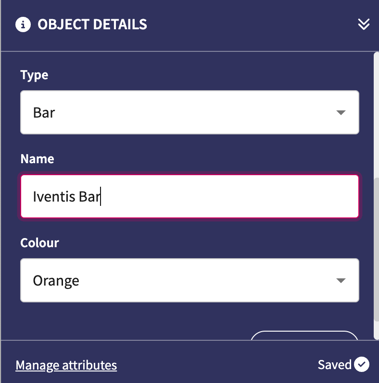
You can “copy and paste” objects with the same attributes to save time and collect identical data avoiding unnecessary duplication.
### Managing Attributes
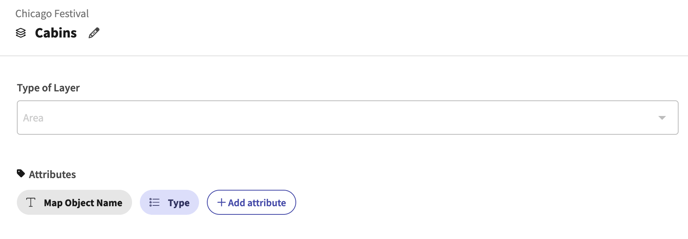
Attributes are managed within your layer. You can edit, delete or add more attributes from the "Layer Settings" panel:
- [Getting started](https://support.iventis.com/getting-started?hsLang=en)
- [Using Iventis](https://support.iventis.com/using-iventis?hsLang=en#main-content)
- [Create: How to build an event site or operational plan](https://support.iventis.com/using-iventis?hsLang=en#create-how-to-build-an-event-site-or-operational-plan)
- [Share: How to share your event site and venue plans](https://support.iventis.com/using-iventis?hsLang=en#share-how-to-share-your-event-site-and-venue-plans)
- [Analysis: How to analyse costs, bill of quantities, and more!](https://support.iventis.com/using-iventis?hsLang=en#analysis-how-to-analyse-costs-bill-of-quantities-and-more)
- [3D Line Models](https://support.iventis.com/using-iventis?hsLang=en#3d-line-models)
- [Digital Twin](https://support.iventis.com/using-iventis?hsLang=en#digital-twin)
- [Tips & Tricks](https://support.iventis.com/tips-tricks?hsLang=en)
- [FAQs](https://support.iventis.com/faqs?hsLang=en#main-content)
- [Permissions](https://support.iventis.com/faqs?hsLang=en#permissions)
# Iventis
Tel: + 44 (0) 203 443 9030
Copyright © 2026, Iventis